
Download Arlinear – AI Quiz Creator, Free, Secure & Fast
Overview
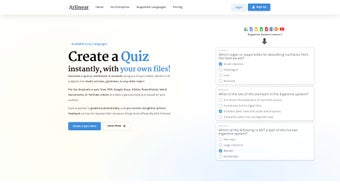
Arlinear is a cloud‑based, AI‑driven quiz creator designed for teachers, trainers, and students who need to turn any piece of content into a ready‑to‑use assessment in seconds. By leveraging advanced natural‑language processing, the platform can ingest documents, slide decks, PDFs, or even YouTube videos, extract key concepts, and automatically generate multiple‑choice, true/false, and short‑answer questions. Once a quiz is generated, the built‑in grading engine evaluates responses instantly, provides detailed explanations, and visualizes each learner’s strengths and weaknesses on an interactive dashboard.
Arlinear also offers a practice mode where short‑answer items receive contextual AI hints, encouraging iterative learning. Multilingual support enables the creation of quizzes in over 30 languages, making it a truly global solution. All data is encrypted in transit and at rest, complying with GDPR, FERPA, and other privacy standards, so educators can trust that student information remains secure.
Because the service runs entirely in a web browser, there is no software download, no OS‑specific installer, and no hardware limitation—any modern device with an internet connection can access the full feature set. In short, Arlinear eliminates the tedious manual steps of traditional quiz creation, delivering a fast, secure, and collaborative assessment workflow that scales from a single classroom to whole institutions.
Key Features and How to Get Started
- AI‑Generated Quizzes from Any Source: Upload Google Docs, Slides, PowerPoint, PDFs, or paste a YouTube URL and watch Arlinear instantly produce a full quiz.
- Automatic Grading & Real‑Time Feedback: Answers are evaluated on the fly, with scores, explanations, and analytics displayed instantly.
- Practice Mode with AI Hints: Short‑answer questions receive contextual suggestions to help learners refine their responses before a high‑stakes exam.
- Strengths & Weaknesses Dashboard: Visual charts pinpoint knowledge gaps, enabling targeted study plans for both educators and students.
- Multilingual Support: Create, share, and grade quizzes in more than 30 languages without leaving the platform.
- Flexible Sharing & Export Options: Publish quizzes via secure links, embed in LMSs, download printable PDFs, or export CSV data for offline analysis.
- Secure Cloud Processing: End‑to‑end encryption (TLS 1.3 & AES‑256) ensures data privacy and compliance with major regulations.
- Free Core Tier: No subscription required for basic quiz generation, automatic grading, and standard reporting.
- Regular Updates & Community Support: Monthly feature releases and an active user forum keep the tool current and responsive.
Getting started with Arlinear is intentionally straightforward. First, navigate to arlinear.com and create a free account using an email address or a Google Workspace credential. After signing in, click “Add Source” to connect Google Drive, upload a local file, or paste a YouTube link.
The platform will request the minimal permissions needed to read the selected content. Once the source is linked, select “Create Quiz,” choose the desired question type, set the number of questions, and let the AI work its magic. Within seconds a complete quiz appears in the editor where you can edit wording, add images, or reorder items.
When satisfied, click “Publish” to generate a shareable link, embed code, or download a PDF version. Because Arlinear runs entirely in the browser, it works on Windows, macOS, Android, and iOS devices—any system that supports Chrome, Edge, Firefox, or Safari. This cross‑platform compatibility makes it an ideal BYOD (Bring Your Own Device) solution for schools, universities, and corporate training programs.
Pros and Cons – Quick Decision Matrix
Pros
- Lightning‑fast AI quiz generation from diverse source materials.
- Fully automated grading eliminates manual workload and reduces errors.
- Practice mode delivers personalized, AI‑driven hints for short‑answer items.
- Multilingual capability expands reach to international classrooms and remote learners.
- GDPR‑ and FERPA‑compliant encryption keeps student data secure.
- Free core tier makes the tool accessible for budget‑conscious institutions.
- Seamless integration with Google Workspace and major LMS platforms.
- Regular feature updates based on community feedback keep the product fresh.
Cons
- Advanced analytics (predictive performance, detailed item‑analysis) are locked behind paid plans.
- Continuous internet connection is required; low‑bandwidth environments may experience slower processing.
- AI hints for short‑answer questions are currently limited to English and a handful of major languages.
- Custom branding (logo, color scheme) is only available to premium subscribers.
- Large video files can increase processing time during quiz generation.
Frequently Asked Questions & Final Thoughts
Is Arlinear really free to use?
Yes. The core features—including AI quiz generation, automatic grading, and basic reporting—are completely free. Premium subscriptions unlock advanced analytics, custom branding, and expanded language support.
Can I import quizzes created in other platforms?
Arlinear supports CSV and QTI imports, allowing you to bring existing question banks into the system and immediately benefit from its AI‑enhanced grading and feedback tools.
How does the AI generate questions from a YouTube video?
The platform first transcribes the video using speech‑to‑text technology, then applies natural‑language processing to identify key concepts, facts, and definitions. From this analysis it creates relevant multiple‑choice and short‑answer items.
Is student data stored securely?
All data is encrypted both in transit (TLS 1.3) and at rest (AES‑256). Arlinear complies with GDPR, FERPA, and other major privacy regulations, ensuring that personal information remains confidential.
Can I use Arlinear offline?
Because the AI processing runs on cloud servers, an internet connection is required for quiz generation and grading. However, once a quiz is exported as a PDF or printed, it can be used offline without any loss of functionality.
Arlinear has transformed the way I design assessments. In less than five minutes I can turn a 30‑page PDF or a 10‑minute lecture video into a fully graded quiz. The automatic feedback and strength‑weakness analytics give my students clear guidance on where to focus their study time. For any educator looking to save time, improve grading accuracy, and provide a modern, AI‑enhanced learning experience, Arlinear is the go‑to tool.
Ready to streamline your quiz creation process? Download Arlinear now and start generating secure, AI‑powered assessments for free. Whether you teach high‑school physics, college literature, or run corporate training, Arlinear adapts to your content and delivers instant, reliable results.



.png)



